نمایش My-Computer و کنترل پنل در دسکتاپ ویندوز 10
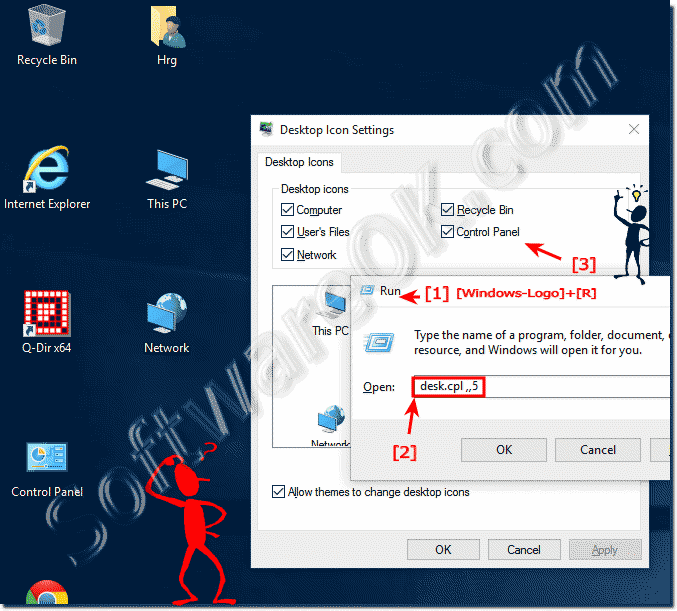
The solution is simple to Show My-Computer and Control Panel on Desktop in Windows 10?Please press the Windows-10 key combination [Win-Logo]+[D] to see the Windows-10 desktop. You can open the window Desktop Icons Settings via Windows-10 Run Windows+R and command desk.cpl ,,5. Enable the desktop icons for Window-10, (Computer = My Computer = This PC) In the window "Desktop Icons Settings" (... see Image-1) what you want to see on the Windows 10 Desktop. See also: Windows 10 desktop icons are so big, why || Customize icon spacing on the windows 10 desktop
 |
+ نوشته شده در سه شنبه پنجم آبان ۱۳۹۴ ساعت 6:36 توسط بهنام پیــــــروی قله زو
|
 این وبگاه جهت افزایش سطح دانشی و مهارتی و بنا بر نیاز طراحی گردیده است امیدواریم با نظرات و پیشنهادات سازنده خود ما را یاری نمایید.